How to compare Deriv Partners Hub and paid-ad metrics before spending
Track real accounts, sign-ups, deposits, ad spend, and referral clicks in Deriv Partners Hub to measure conversion gaps and campaign results.
Before you pay to promote a post or launch a campaign, decide what a worthwhile referral looks like. Deriv Partners Hub shows what happens after people use your referral link: sign-ups, real accounts, first-time depositors, first-time traders, trading activity, and commission. Your ad platform shows what you paid to reach them: spend, impressions, clicks, and campaign results.
Use both sources together. Partners Hub confirms the quality of referrals attributed to you. It does not show which Meta, Google, TikTok, or YouTube campaign, audience, or creative caused each result.
Quick summary
- Check Partners Hub before you spend to understand your current referral funnel
- Use your ad platform to track spend, impressions, clicks, cost per click (CPC), and the result tied to your campaign objective
- Use Partners Hub to review sign-ups, real accounts, first-time depositors (FTDs), first-time traders (FTTs), activity, and commission
- Compare the same date range, country, and campaign conditions before drawing conclusions
- Treat the results as directional unless you have a reliable campaign-level tracking method
The two data sources you need for paid ads
Paid-ad measurement starts with two different systems. Each answers a different question.
Campaign objective is the action you ask an ad platform to optimise for, such as landing-page visits, leads, or engagement. CPC is the average amount you paid for each click. These metrics help you assess delivery. They do not, on their own, show referral quality.
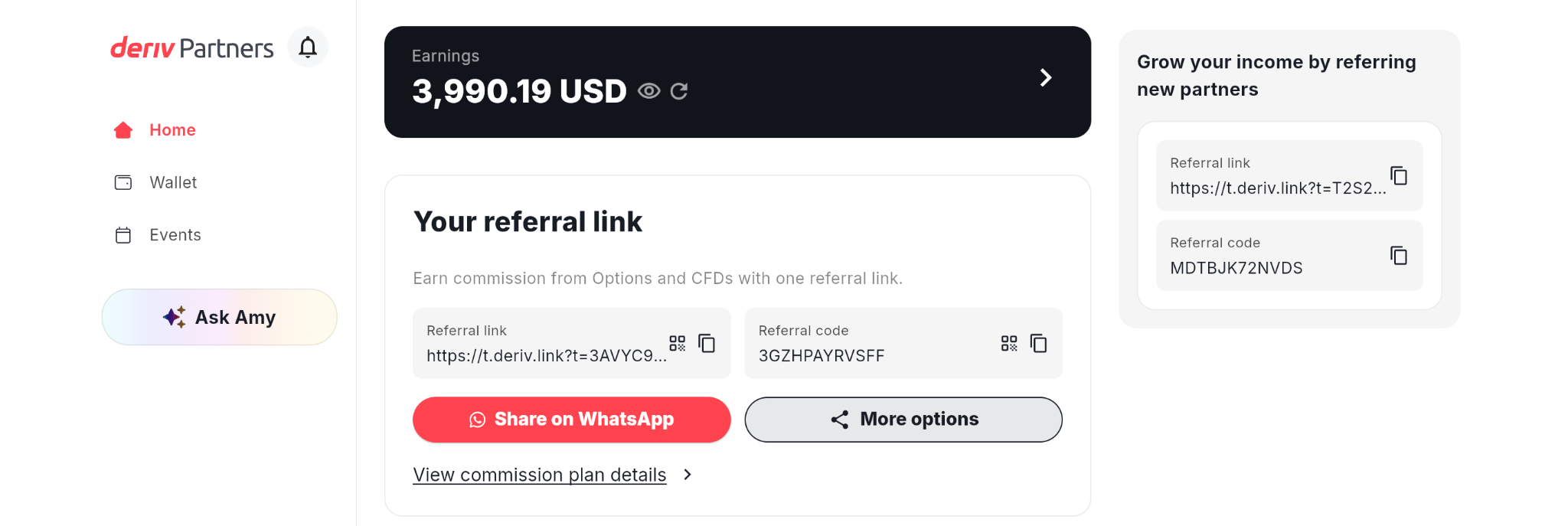
Illustrative figures only — not verified or representative of typical earnings.
What to check in Deriv Partners Hub before you launch an ad
Start in Partners Hub, then select the month you want to review. The Reports section gives you a baseline: the results you are getting before a new paid test begins.
Sign-ups: follow the referral funnel
Open the Sign-ups report to review these four stages:
- Sign-ups: people whose accounts were attributed to your referral link
- Real accounts: referred people who created a real Deriv account
- First-time depositors (FTDs): referred clients who made their first deposit
- First-time traders (FTTs): referred clients who placed their first trade
A high number of sign-ups can be useful, but it is not the whole result. Compare it with real accounts, FTDs, and FTTs to understand whether your referrals are progressing.
The client table can also help you spot patterns. Review the joining date, country, account status, and trading volume. For example, if a small test targets one country, you can review whether new referrals appeared in that country during the test period. This is a useful signal, not proof that one campaign caused each sign-up.
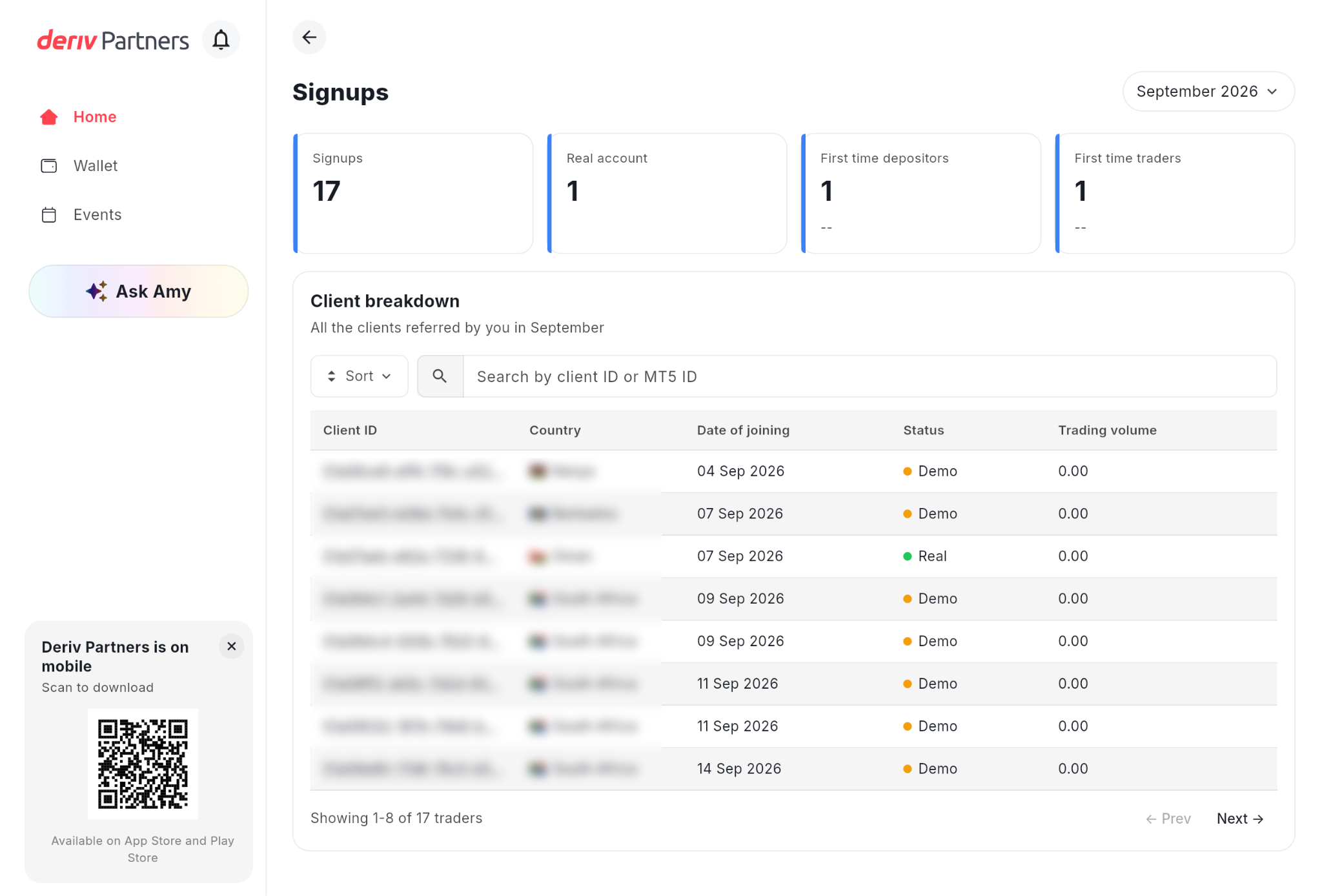
Illustrative figures only — not verified or representative of typical earnings.
Activity: look beyond the first conversion
Open Activity to review monthly commission, product-level activity, and active traders. The Active Trader Breakdown can show a referred client's country, platform, trading volume, and the commission attributed to you.
This is where you can look for signals of referral quality over time. A low-cost campaign that produces many sign-ups but no real accounts or activity needs a different response from a campaign that produces fewer, more engaged referrals.
Commission can change while a reporting period is still open. Do not treat an early monthly figure as a final result.
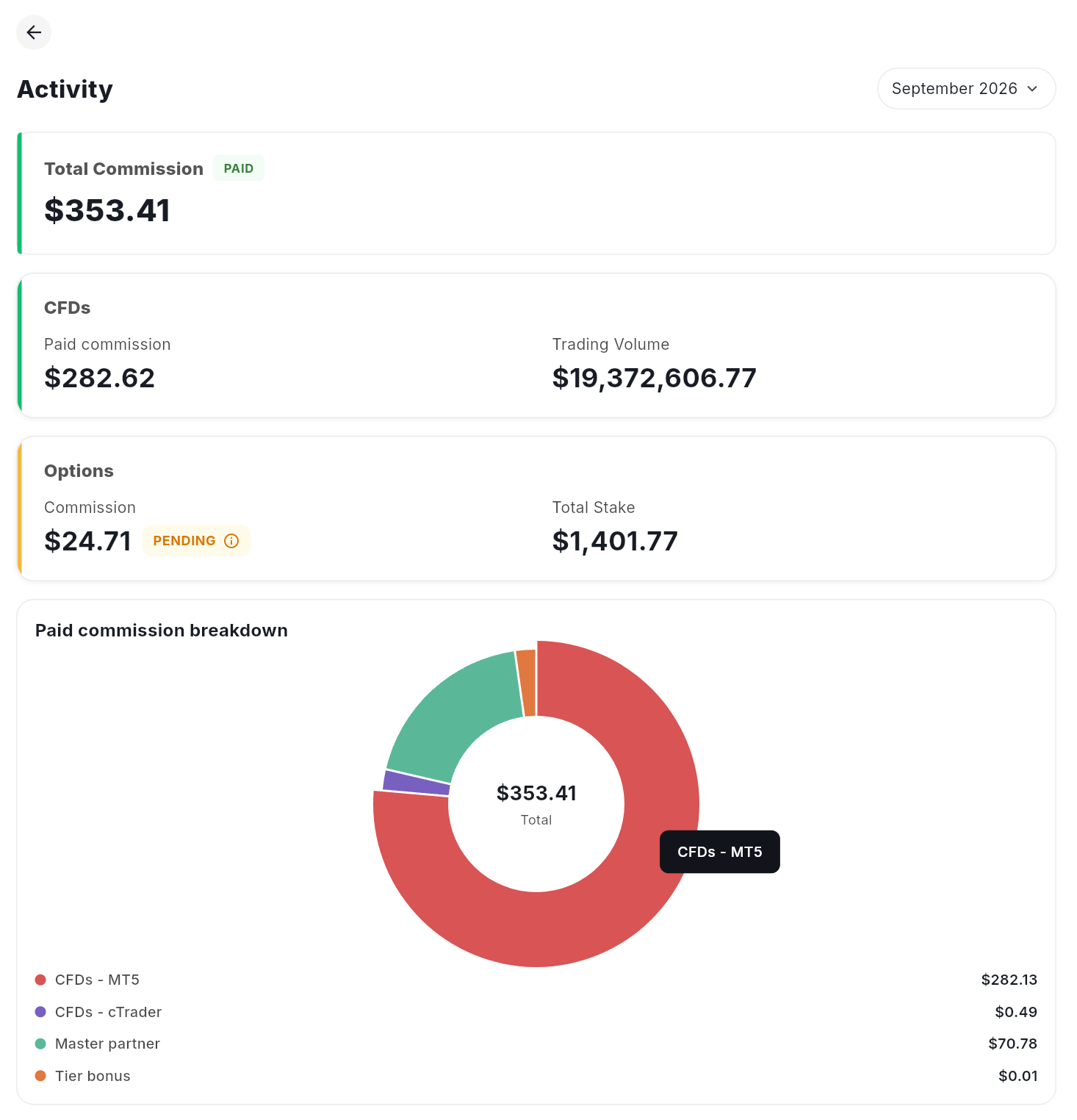
The chart data displayed is for illustrative purposes only. Illustrative figures only — not verified or representative of typical earnings.
Build a simple measurement plan before a paid-ad test
Set up one record for every test before you spend. You can use a spreadsheet, a notebook, or your team’s campaign tracker. Keep the information consistent so you can compare results fairly.
Keep the first test focused. Change one meaningful variable at a time, such as the creative angle or the audience. If you change the country, budget, audience, and creative at once, you will not know what influenced the outcome.
Compare results without over-claiming attribution
Use this simple review routine after your test ends:
1. Confirm the test window
Review your ad-platform report and Partners Hub using the same start and end dates.
2. Review delivery in the ad platform
Check spend, impressions, clicks, CPC, and the result linked to your campaign objective.
3. Review referral progression in Partners Hub
Check whether sign-ups moved on to real accounts, FTDs, FTTs, and activity.
4. Compare quality, not only volume
An ad with fewer clicks may still be more useful if the referrals show stronger progress through the funnel.
5. Decide the next test
Keep a promising idea running at a controlled budget, improve one weak element, or pause a test that does not support your goal.
Example: how to read a small Meta test
This is an illustrative example, not a typical result or a promise of performance.
You run two Meta creatives for seven days in the same market. Creative A gets more clicks. Creative B gets fewer clicks, but the test period lines up with more real accounts and FTDs in Partners Hub.
Creative B may be the stronger message to test next. It is not automatically the winner, because Partners Hub does not identify the exact campaign or creative behind each referral. Use the result as a directional signal, then run another controlled test before increasing your budget.

Do and do not use Partners Hub this way
Use the dashboard to ask better questions
Partners Hub does not replace your ad platform. It helps you ask whether paid traffic is becoming valuable referrals.
After every test, ask:
- Did the campaign reach the country and audience I planned to test?
- Did the referrals progress beyond sign-up to real account, FTD, or FTT?
- Did the campaign attract people who later showed trading activity?
- What should I change once before I test again?
Use these questions to make measured decisions. Paid ads can help you test and distribute an educational message, but they do not guarantee referrals, commission, or trading activity.
Next steps
Now that you know what you can measure, make sure your message is worth promoting. Continue with How to build an affiliate marketing foundation before running partner paid advertising.
For a deeper walkthrough of the reports used in this lesson, see Deriv Partners Hub dashboard guide: How to optimise performance and How Deriv partner tracking and referral attribution work.

Quiz
FAQs